A follow-up to our guide on How to Write, Plan, and Personalize an Acquisition Strategy Plan
When most people think about acquisition planning, they focus on the written strategy document. But experienced procurement professionals know that the numbers have to be just as solid as the narrative — and that's exactly where the Capital Funding spreadsheet comes in.
This article walks you through the Capital Funding Excel template, explains what each section means, and gives you a set of practical AI prompts you can use to populate, personalize, and stress-test your funding data — even if you're not a financial analyst.
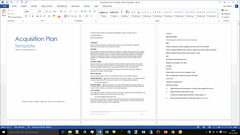
📥 Download the full Acquisition Plan template bundle — including the Capital Funding Excel file, 5-Year Plan, Process Timeline, and Word document templates — at klarititemplates.com
What Is the Capital Funding Section and Why Does It Matter?
The Capital Funding section is the financial backbone of your Acquisition Plan. While the strategy document tells stakeholders what you plan to acquire and why, the Capital Funding spreadsheet tells them how much it will cost — broken down by category, unit, and total — and how that cost is justified across the life of the project.
It matters for several reasons. Budget approvals at different threshold levels (under $1M, $5M, $10M) typically require increasingly rigorous financial documentation. Procurement officers, finance teams, and executive sponsors all rely on this data to validate that the acquisition is both necessary and affordable. Without a well-structured Capital Funding breakdown, even a well-written strategy document can stall at the approval stage.
What Does the Capital Funding Template Actually Include?
The Capital Funding Excel template is structured as a straightforward cost table with four main cost categories, a contingency line, and a grand total. Here's what each section covers:
Software Costs capture all software licenses, subscriptions, SaaS fees, and any custom development costs. Each line item shows the number of units, the unit cost, and the calculated total cost. Software is often underestimated — this section forces you to itemize rather than guess.
Hardware Costs cover all physical equipment: servers, workstations, networking gear, peripherals, and any specialized devices. Hardware procurement is typically where the largest single-item costs appear, and itemizing by unit helps surface quantity-based discounts worth negotiating.
Resource Costs include all personnel-related acquisition expenses — contractor fees, implementation consultants, training costs, and internal staff time that needs to be formally costed. This is the section most organizations forget to complete fully, often resulting in budget overruns.
Other Costs is a catch-all for costs that don't fit neatly elsewhere: shipping and logistics, insurance, site preparation, third-party audits, travel for vendor evaluations, and similar items. Small individually, these costs add up significantly when left untracked.
Contingency is a buffer — typically 10–20% of the total project cost — that accounts for unexpected costs, price changes, or scope adjustments. This isn't padding; it's sound financial practice, and most experienced approvers expect to see it.
Grand Total is the sum of all of the above, and the number that flows into your Acquisition Plan's Background section as the "Estimated Contract Amount."
How Does the Capital Funding File Relate to the 5-Year Plan?
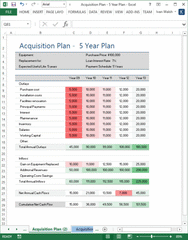
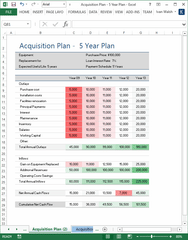
The Capital Funding file and the 5-Year Plan spreadsheet work together to give a complete financial picture. Where Capital Funding captures the upfront cost structure of the acquisition, the 5-Year Plan models the financial performance of the acquisition over time — typically covering annual outlays, inflows, net cash flows, and cumulative cash position across a five-year horizon.
The 5-Year Plan includes outlay line items like purchase cost, installation, facilities renovation, principal loan payments, interest, maintenance, inventory, salaries, and working capital. On the inflow side, it captures gains on replaced equipment, additional revenues generated, and operating cost savings. The result — net annual cash flow and cumulative net cash flow — is what most executive sponsors and finance committees actually want to see: will this acquisition pay for itself, and when?
Think of it this way: the Capital Funding table answers "how much will we spend at the start?" and the 5-Year Plan answers "what do we get in return, and over what timeframe?"
I've Never Built a Capital Funding Spreadsheet Before. Where Do I Start?
Start with what you know, not what you don't. Before you open the spreadsheet, answer these four questions in plain language:
What are we buying? List every item — software, hardware, services, people. Don't worry about grouping yet; just get the inventory down.
How many of each? Unit counts matter because they unlock volume pricing, licensing tiers, and procurement efficiencies you might not otherwise see.
What does each one cost? Use vendor quotes wherever possible. For items without quotes yet, use market research estimates and flag them clearly. The template's "Other Costs" section is the right place to note items where pricing is still being confirmed.
What are we uncertain about? These uncertainties feed directly into your contingency calculation. A well-justified contingency line is far more credible than an unjustified one.
Once you have rough answers to these questions, the AI prompts below will help you translate them into fully structured spreadsheet content.
6 AI Prompts to Populate and Personalize Your Capital Funding Spreadsheet
These prompts are designed to work with any AI assistant — ChatGPT, Claude, Gemini, or others. Copy each prompt, replace the bracketed placeholders with your project details, and use the AI's output as your first draft. Then review, adjust, and validate against vendor quotes before finalizing.
Prompt 1: Generate Your Software Cost Breakdown
"I'm completing the Software section of a Capital Funding spreadsheet for an Acquisition Plan. Our project involves [describe the project, e.g., 'implementing a new enterprise resource planning system for a 200-person organization']. We anticipate needing the following types of software: [list what you know, e.g., 'a core ERP platform, data migration tools, reporting/analytics add-ons, and end-user training licenses']. For each software item, provide: a short item name, a realistic quantity (number of units or licenses), an estimated unit cost range based on market rates for [current year], and a brief justification for including it. Format the output as a table with columns: Item Name | Category | # Units | Estimated Unit Cost | Total Cost | Justification."
Prompt 2: Build Your Hardware Cost Itemization
"I need to complete the Hardware section of a Capital Funding spreadsheet for [Project Name]. The system we're acquiring will [describe its function, e.g., 'process real-time data from 50 field locations and store it centrally at our data center']. Our existing infrastructure includes [describe briefly, e.g., 'aging servers from 2018, standard office workstations, and a 1Gbps local network']. Based on this, generate a realistic hardware cost breakdown that includes: server or hosting infrastructure, networking equipment, workstations or endpoint devices (if needed), any specialized hardware, and installation/setup equipment. For each item, provide quantity, estimated unit cost, total cost, and a one-sentence justification. Use realistic market pricing for [current year]."
Prompt 3: Cost Out Your Resource Requirements
"I'm completing the Resource Costs section of a Capital Funding spreadsheet. For a [describe project type, e.g., 'six-month cloud migration project'] at a [describe organization, e.g., 'mid-sized government agency with limited internal IT capacity'], help me identify and cost the following types of resources: implementation consultants, project management, technical leads, end-user training facilitators, and internal staff time that should be formally allocated. For each resource type, suggest a realistic number of units (e.g., person-months or day rates), an estimated unit cost based on current market rates, and a total. Also flag any resource costs that are commonly overlooked in this type of acquisition. Format as a table: Resource Type | Units | Unit Cost | Total | Notes."
Prompt 4: Identify and Estimate Other Costs
"I need to fill in the 'Other Costs' section of a Capital Funding spreadsheet for an Acquisition Plan. The project involves [describe project]. Common 'other costs' in acquisitions include things like shipping and logistics, vendor travel expenses, third-party audits or security assessments, insurance, legal fees, and licensing transfer fees. Based on a total project cost estimated at approximately [$X], suggest a realistic breakdown of other costs I should include, with estimated amounts and a brief explanation of why each is relevant to this type of acquisition. Flag any that are frequently missed."
Prompt 5: Calculate and Justify Your Contingency
"I'm finalizing the Contingency line in a Capital Funding spreadsheet. The subtotal of Software, Hardware, Resource, and Other Costs is [$X]. The project involves [brief project description] and will run for approximately [duration]. Help me determine an appropriate contingency percentage (typically 10–20%) and write a 2–3 sentence justification for the amount chosen. The justification should reference specific risk factors relevant to this type of acquisition — such as vendor pricing volatility, scope uncertainty, regulatory changes, or implementation risk — that support the contingency amount."
Prompt 6: Build a 5-Year Cash Flow Narrative
"I've completed the upfront Capital Funding breakdown for [Project Name]. The Grand Total is [$X]. Now I need to model the financial case for this acquisition over a 5-year period using our 5-Year Plan spreadsheet. The acquisition will generate value through [describe: e.g., 'replacing legacy software that costs $X per year to maintain, reducing manual processing hours by 40%, and enabling new service delivery that generates estimated additional revenue of $Y per year']. Help me populate the following rows for Years 1 through 5: Purchase cost, Installation costs, Facilities renovation (if any), Principal Payments (loan amount: $X at 7% over 5 years), Interest, Maintenance, Salaries (relevant ongoing costs), Working Capital. Then suggest realistic figures for Inflows: Gain on Equipment Replaced, Additional Revenues, and Operating Cost Savings. Format as a year-by-year table I can paste directly into Excel."
How Do I Determine the Right Contingency Percentage?
Contingency isn't arbitrary — it should reflect the specific risk profile of your acquisition. A few rules of thumb:
A 10% contingency is appropriate when the acquisition scope is very well-defined, vendor pricing has been confirmed through formal quotes, the implementation timeline is short, and the organization has done similar acquisitions before.
A 15% contingency fits most standard acquisitions — those with a reasonably clear scope but some open items, where pricing is based on estimates rather than locked quotes, or where the organization is working with a new vendor or technology type.
A 20% or higher contingency is warranted for complex, first-of-kind, or strategically critical acquisitions: large-scale system integrations, acquisitions with significant regulatory dependencies, projects running over multiple fiscal years, or any acquisition where the requirements are still being finalized.
When presenting your contingency to approvers, always write a brief justification that ties the percentage to specific, named risk factors. "We've applied a 15% contingency based on the fact that vendor quotes are estimates pending final RFP responses and that this is the organization's first cloud-based implementation of this type" is far more credible than simply listing a number.
How Should I Handle Items Where I Don't Have Vendor Quotes Yet?
This is more common than most acquisition plans admit. The key is transparency: label unconfirmed estimates clearly in the spreadsheet using a consistent notation (e.g., adding "(Est.)" to the item name or highlighting cells in yellow), and document your estimation method in a comment or adjacent cell.
For market-rate estimates, use published pricing benchmarks from industry sources, recent similar procurement awards in your sector (many government agencies publish contract award data), or direct AI prompts — specifically Prompts 1 and 2 above — to generate market-rate ranges as a starting point.
Track which line items are confirmed versus estimated, and update the spreadsheet as vendor quotes come in. A well-maintained Capital Funding file that clearly shows "confirmed: 8 of 14 items" is more credible than one that appears finalized but contains unexplained numbers.
How Do I Make Sure My Excel Totals Are Accurate?
The Capital Funding template uses simple SUM formulas — each category subtotal sums its line items, and the Grand Total sums the category subtotals plus contingency. Before submitting your plan for approval, run through this checklist:
First, verify that every line item has a value in the # Units column and the Unit Cost column, and that the Total Cost column is calculated as a formula (Units × Unit Cost), not a manually entered number. Manually entered totals break when you update a unit cost.
Second, confirm that each category subtotal row actually references all of its line items. A common error is adding a new row at the bottom of a category after the SUM formula was written, so the new row falls outside the formula range.
Third, check that the Grand Total row sums all category subtotals plus the contingency line. Open the formula and visually confirm every reference.
Finally, do a sanity check: add up the category subtotals on a calculator and compare to the Grand Total. If they don't match, there's a formula error somewhere.
How Do I Present the Capital Funding Data to Stakeholders Who Aren't Financial Experts?
The spreadsheet is your source of truth, but most stakeholders don't want to read a spreadsheet — they want a clear answer to "how much will this cost and is it reasonable?"
Here's an approach that works well: summarize the Capital Funding table in a single paragraph in the Background section of your Acquisition Plan Word document. Something like:
"The total estimated acquisition cost is $470,000, comprised of $60,000 in software licensing, $100,000 in hardware procurement, $150,000 in resource and implementation costs, $90,000 in other project costs, and a 15% contingency of $70,000. Detailed line-item costing is provided in the Capital Funding spreadsheet attached as Appendix B."
This gives decision-makers the headline number with enough context to feel confident, while pointing them to the spreadsheet for the detail they may want to review later.
Can I Use AI to Review My Completed Capital Funding Table for Gaps or Errors?
Yes — and this is one of the most valuable uses of AI in the entire acquisition planning process. Once you've populated your Capital Funding spreadsheet, paste the contents into an AI tool and use a prompt like this:
Prompt: Review Your Capital Funding Table for Gaps
"Here is the Capital Funding breakdown I've prepared for [Project Name], which involves [brief project description]:
[Paste your table here — category, item name, units, unit cost, total cost]
Please review this breakdown and: (1) identify any cost categories or line items that are commonly required for this type of acquisition but appear to be missing, (2) flag any unit costs that seem significantly above or below typical market rates for [current year], (3) note any items where the number of units seems inconsistent with the project scope described, and (4) suggest whether the contingency amount of [$X / X%] seems appropriate given the risk profile of this project."
This kind of AI review catches gaps that are easy to miss when you're close to the document — forgotten ongoing maintenance costs, missing training line items, or hardware quantities that don't match the stated system scale.
Where Can I Download the Templates?
The complete Acquisition Plan bundle includes everything you need to build both the financial and narrative components of your acquisition documentation:
- Capital Funding Tracker (Excel .xlsx) — the spreadsheet covered in this article
- 5-Year Acquisition Plan (Excel .xlsx) — multi-year cash flow modeling
- Acquisition Process Timeline (Excel .xlsx) — procurement milestone tracker
- Acquisition Plan Template – Blue Theme (Word .docx)
- Acquisition Plan Template – Blue Theme with Cover Image (Word .docx)
- Acquisition Plan Template – Red Theme (Word .docx)
- Acquisition Plan PDF — print-ready reference version
👉 Download the complete Acquisition Strategy Plan template bundle at klarititemplates.com
Missed the first article in this series? Read How to Write, Plan, and Personalize an Acquisition Strategy Plan for a complete walkthrough of the Word document templates, including three AI prompts for drafting your Acquisition Overview, Sourcing Strategy, and Key Dates sections.